Kadence Pro ⭐⭐⭐⭐⭐
Kadence Free vs Pro
Kadence Pro is an excellent choice for better website customization if you own an agency or have clients worldwide. The Kadence Pro version is strongly recommended for creating professional websites, WordPress blogs, or eCommerce websites.
Want any discount on Kadence?
Deal:- $20 off on Bundles using our Exclusive Link
This is the detailed comparison between Kadence free vs pro theme. In this guide, I will share all features, ease of use, pricing, and pros & cons of both Kadence free and pro themes.
I have personally used the Kadence free and pro versions, and I will share this comparison based on my experience.
No doubt, KadenceWP Theme is the most feature-rich WordPress theme that has ever been released.
Customizing Kadence free and paid themes is better & easier than most other themes in the market.
That is why you need to compare the Kadence free and pro themes before choosing the right one.
So, without further delay, let’s get started.
What is Kadence Theme? An Overview
| Feature | Description |
| 📦 Product | KadenceWP Theme |
| ✅ Best For | Affiliate marketers, Business websites, eCommerce Websites & WordPress blogs |
| 👍 Rating | 5 out of 5 ⭐⭐⭐⭐⭐ |
| 📖 Features | Fast, 100% page speed score, Responsive, accessible to all, etc. |
| 💰 Pricing | Free! Premium plans start at $79 to $799 one-time payment |
| ✂️ Discount | Get a 10% discount on a lifetime plan & $20 off on Bundles |
| ⏰ Free Trial | No! 30 days a money-back policy for paid plans |
| 🆚 Alternatives | Generatepress Theme & Astra Theme |
| 🔗 Website | KadenceWP.com |
Kadence is a freemium WordPress theme, which means Kadence comes with both free and paid versions.
You can download the free version from WordPress.org’s official website or even in your website’s themes area. However, you can also purchase the premium theme for more features.
It is a lightweight WordPress theme that helps your site load quickly and offers a wide range of design & customization features.
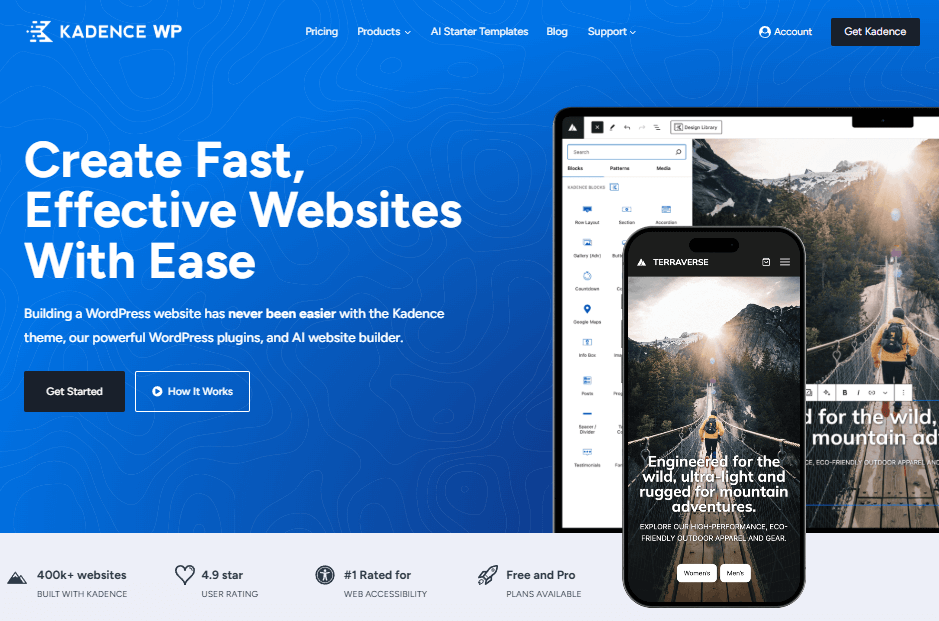
KadenceWP offers a diverse portfolio of themes and plugins, but its highly rated products include the Kadence theme and the Kadence Blocks plugin.
I am using the Kadence theme and the Kadence blocks plugin on my blog, and you can also create an awesome website using this theme & blocks plugin.
Now that you have a basic understanding of the Kadence theme, let’s discuss the detailed Kadence free vs pro comparison so you can choose the right one.
How To Activate Kadence Pro Theme?
Let’s say you have purchased the Kadence pro theme or bundles, and you want to install the Kadence pro theme on your website.
So, here are the step-by-step methods on how you can install the Kadence Pro addon.
First, you have to download the premium theme from the KadenceWP Downloads & License page.
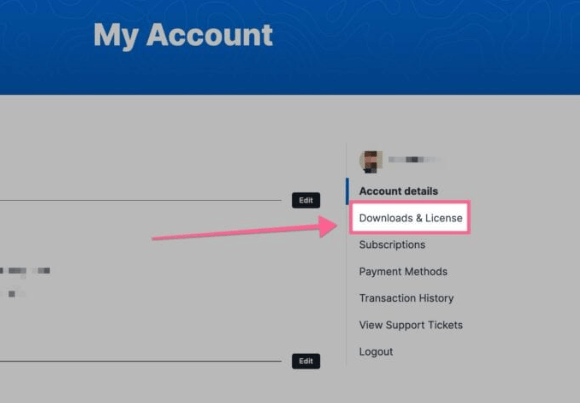
You will see Kadence Theme Pro listed in your Products list and you can click on the Download button to download the Kadence Theme Pro Zip.
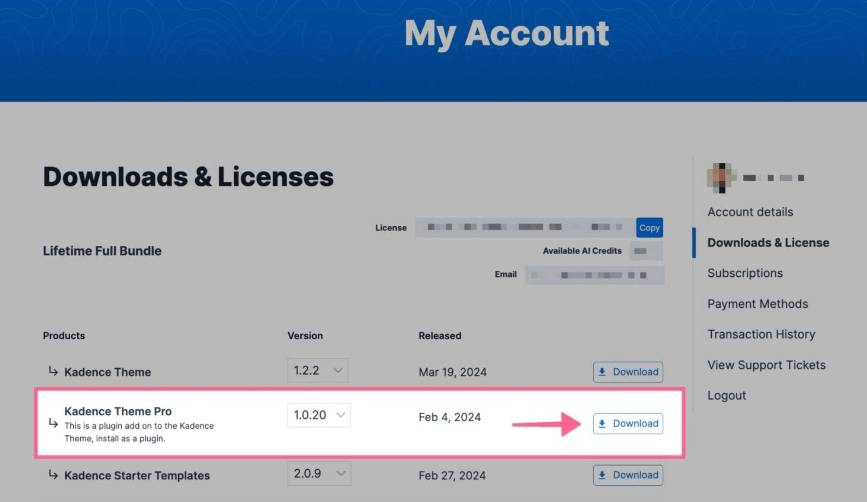
Make sure to leave the file compressed and don’t unzip it.
Then you have to go to your WordPress website dashboard and navigate the Plugins > Add New Plugin.
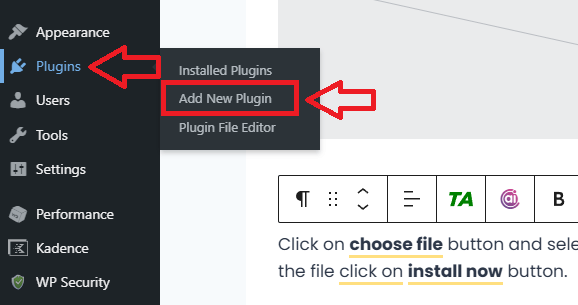
At the top of the Add New Plugin page, click on the Upload Plugin button.
Click on the Choose file button and select your Kadence Theme Pro zip file. After selecting the file, click on install now button.
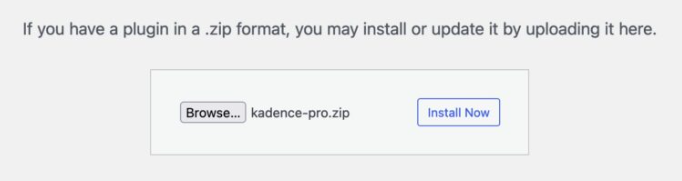
When your theme is installed, click the Activate Plugin button to activate the plugin. Your Kadence pro theme plugin is now installed, and you must license it.
You will also get a prompt in your WordPress Dashboard that says Kadence Theme Pro is not activated. Click here to activate.

You need to click on the link of the prompt, and it will bring you to your Kadence Theme Settings page.
If you do not get the prompt in your dashboard, you can simply navigate to your WordPress Dashboard > Appearance > Kadence page to get here manually.
Here, you can see a license key where you need to enter your license API key to activate your Kadence theme pro plugin.
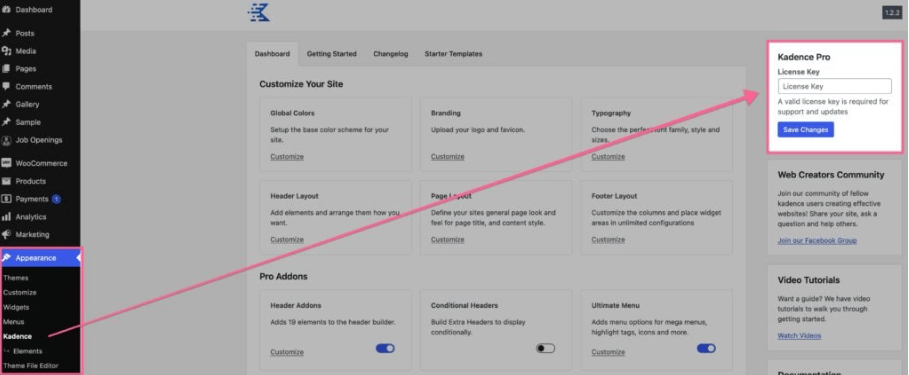
Your License API Key can be found on your KadenceWP Downloads & License page. You can click on the Copy button next to your License Key to copy it directly to your clipboard.
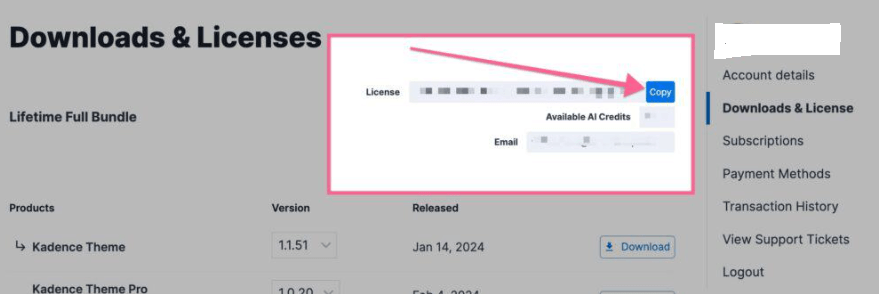
Simply paste the License API key in your Kadence Theme Pro License Key input field and press the Save Changes button.
Congratulations, you have successfully activated the Kadence Pro theme plugin on your website.
Kadence Free vs Pro Comparison 2026

The Kadence Theme offers the best solution for website creation, with both free and pro versions catering to different user needs.
The free version provides essential features like basic header and footer customization, limited starter templates, and WooCommerce support, making it ideal for beginners and small projects.
In contrast, Kadence Pro unlocks advanced features such as premium starter templates, dynamic content integration, advanced WooCommerce addons, and advanced header/footer customization with hooked elements and sticky options.
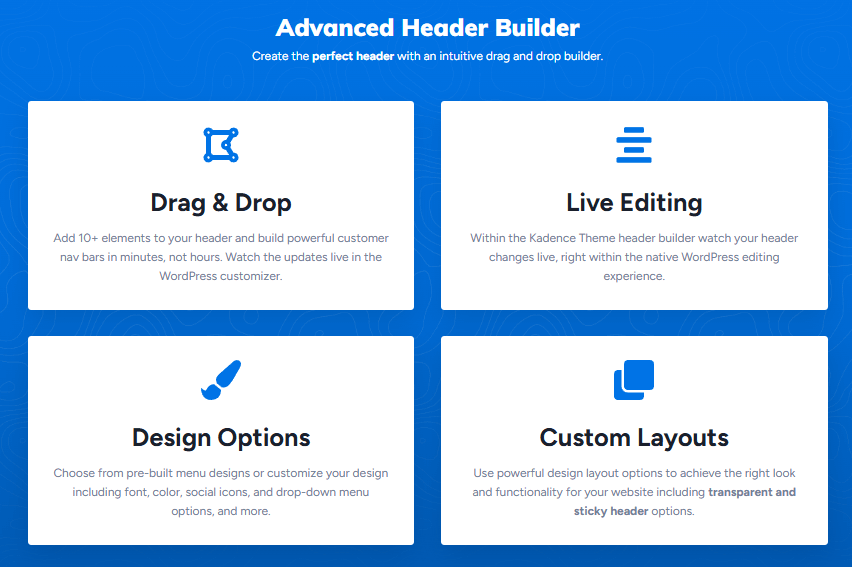
The Pro users also benefit from priority support, global typography controls, and additional performance enhancements.
This makes this theme perfect for professionals, eCommerce sites, and businesses seeking greater flexibility and customization.
There are also some Kadence theme examples doing well in search engines.
Below is a detailed comparison table between Kadence Free vs Pro:
| Key Features | Kadence Pro | Kadence Free |
| Theme Price | $69/year | Zero |
| Usage | Unlimited | Unlimited |
| Header & Footer Builder | ✅ | ✅ |
| Global Colors | ✅ | ✅ |
| Sticky & Transparent Header | ✅ | ✅ |
| Sticky Sidebar | ✅ | ✅ |
| Header Addons | ✅ |  |
| Hooked Element | ✅ | |
| WooCommerce Addon | ✅ | |
| Ultimate Menu | ✅ | |
| Dark Mode | ✅ | |
| Header/Footer Scripts | ✅ | |
| Local Host Gravatar | ✅ | |
| Infinite Scroll | ✅ | |
| Archive Custom Settings | ✅ | |
| Custom Fonts | ✅ | |
| Custom 404 Page | ✅ | |
| Conditional Elements | ✅ | |
| Support | ✅ | |
| Links | Get Now | Get Now |
Let’s start with the Kadence free theme in our Kadence free vs pro comparison.
Short on time? Here’s a quick summary of which theme I found best after comparing both the Kadence free and pro themes:
Kadence Free Theme Features
Kadence free theme costs you nothing and gives you lots of premium features when you install the Kadence theme with ZERO cost.
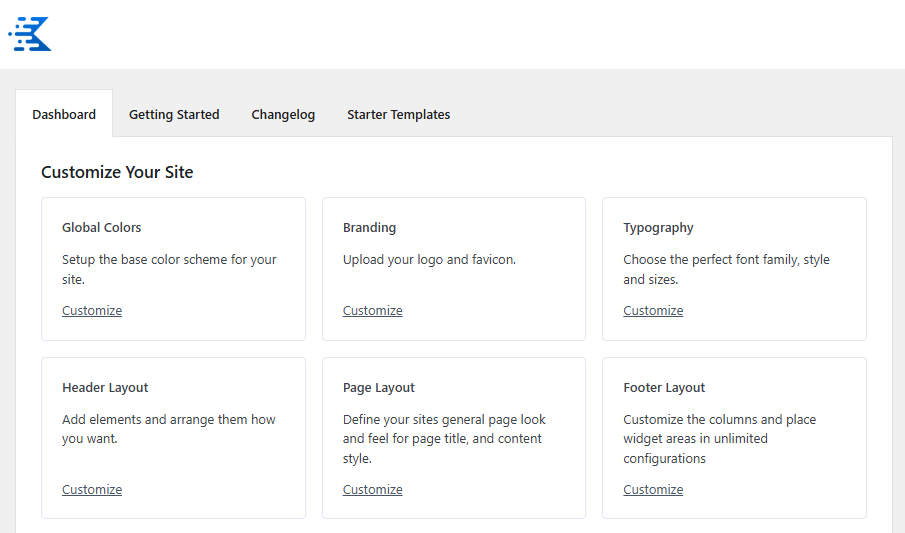
It offers you a drag & drop customization feature, including a header & footer that others don’t offer.
The free theme has 3,00,000+ active installations with 5-star ratings.
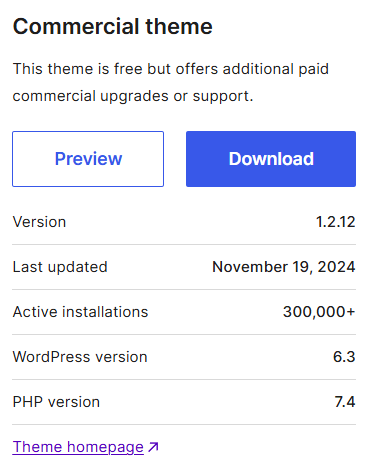
You can find the Kadence free and premium theme features at the “Kadence” link under the “Appearance” tab.
Here are some features available in the free version of the theme:
If you click any of those customized links, you will be redirected to the theme customizer, where you can access the full settings of that section.
Let’s discuss each setting in detail.
Global Colors
You can choose from predefined color palettes and typography settings to maintain consistency across your site, ensuring a cohesive look.
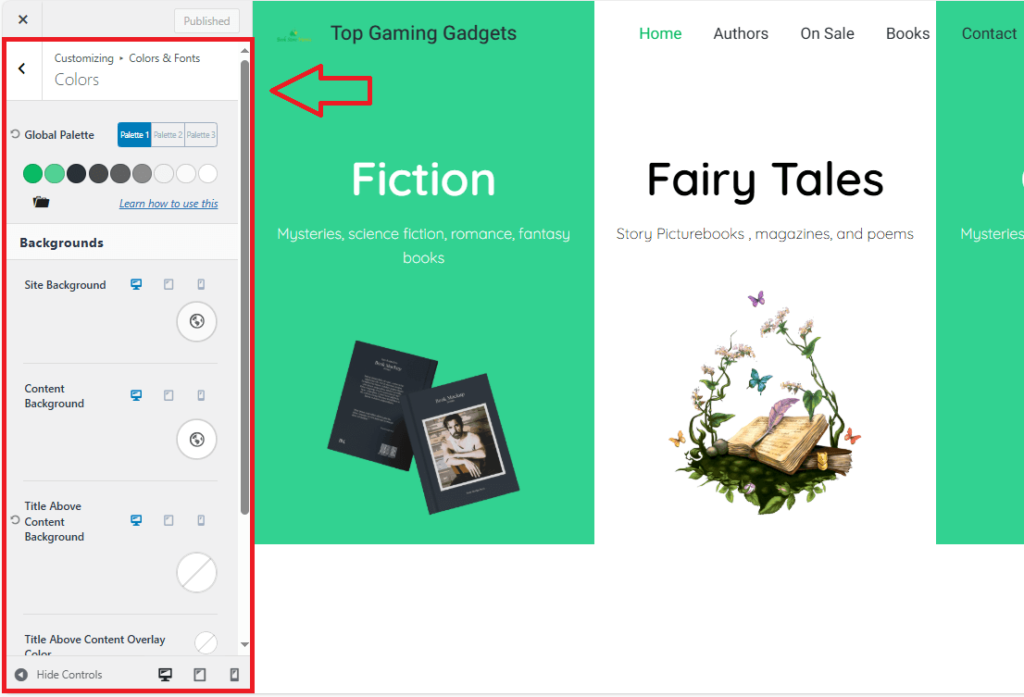
You can control the background color of the entire website, content background color, link color, etc.
Here are the options available in the global colors:
Branding
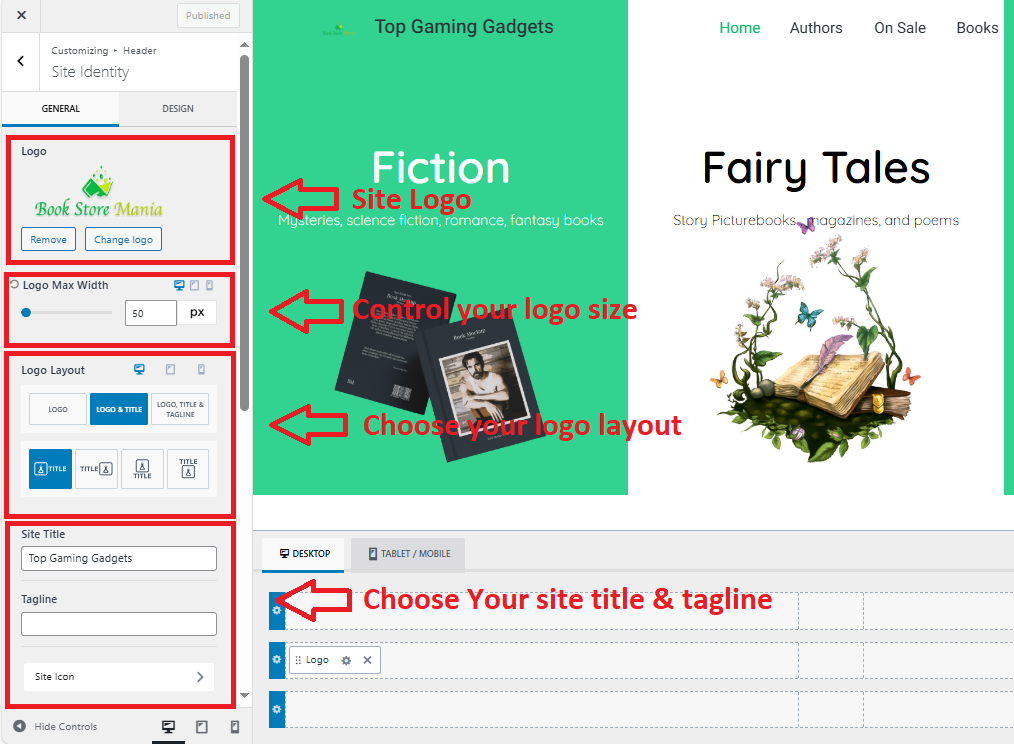
The Kadence branding feature allows you to edit your website logo with logo width & layout, site title & tagline, and your site favicon.
Overall options available in the branding:
In the design option, you will be able to change the site title font, site title hover & active colors settings. The padding option is also available to adjust the correct position of your logo.
Typography
The Kadence Typography feature empowers users to create visually appealing and readable websites with extensive font customization options.
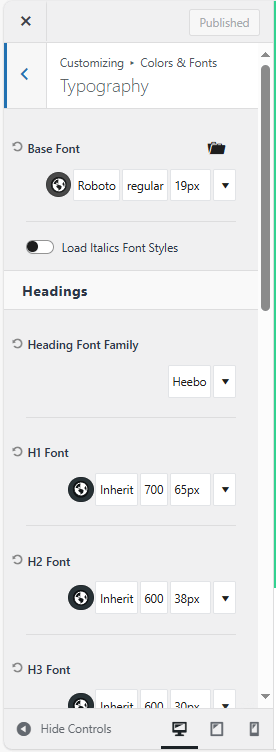


It allows you to choose from a variety of fonts, including Google Fonts, system fonts, and custom-uploaded fonts, ensuring design flexibility.
Header Layout
The header layout is Kadence Theme’s most advanced feature. It offers a drag-and-drop experience similar to a page builder plugin.
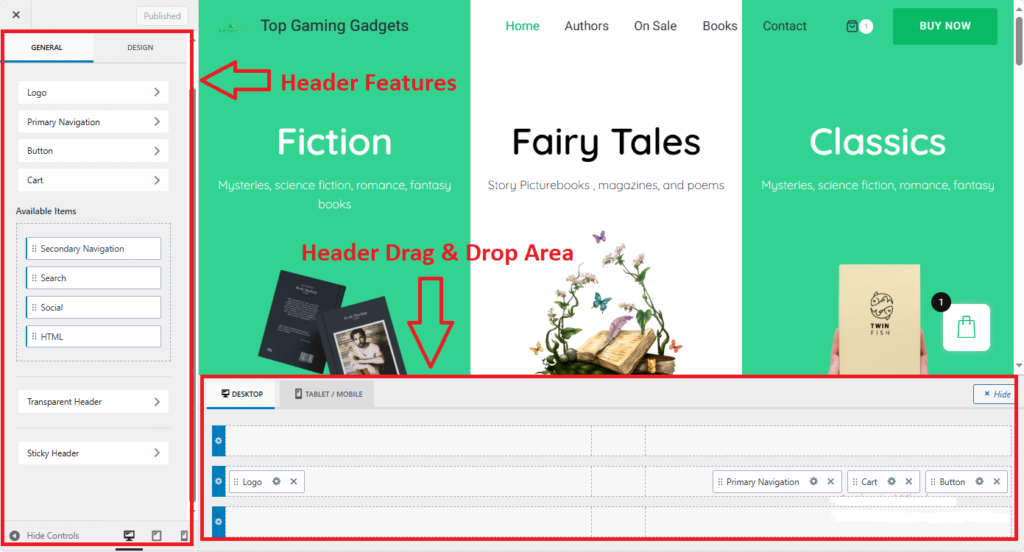
Apart from the general header, you will also get a transparent header and sticky header option.
All the header options are available in the left corner, which you can drag & drop to build your header layout. These are:
You can add up to three rows in the header and up to three columns in each row. Also, you can customize the header in multiple ways, like changing its width, height & color.
Page Layout


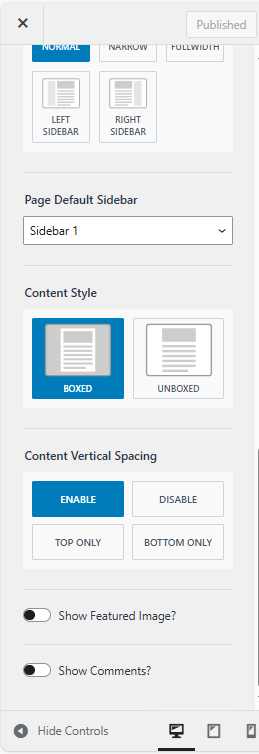
The Kadence Free Theme offers flexible page layout options, enabling you to control the structure and design of your pages. Here’s an overview of its layout features:
Full-Width Layout: Allows content to stretch across the entire width of the browser, ideal for immersive designs like portfolios, landing pages, or image-heavy websites.
Boxed Layout: Keeps your content within a central box with margins or padding on the sides, giving your website a clean and professional appearance.
Narrow Width: A compact layout that limits the width of your content for better readability, commonly used for blogs or text-heavy pages.
Sidebar Options: Depending on your design and content needs, you can choose between no sidebar, a left sidebar, or a right sidebar. This option is perfect for blogs or WooCommerce product pages.
Blank or No Header/Footer Layout: For landing pages or specific needs, Kadence allows you to create a blank canvas by removing the header and footer, letting you focus entirely on the content.
Individual Page Controls: You can set unique layouts for particular pages or posts, giving you granular control over how each page looks and functions.
You can also customize the single-post layout and archive layout, and there’s also an option for custom post types.
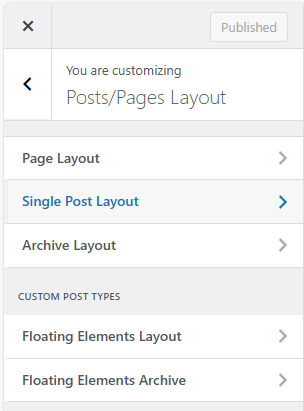
The custom post types contain a floating elements layout and a floating elements archive.
Footer Layout
The footer layout also offers you a drag & drop customization similar to the header layout.
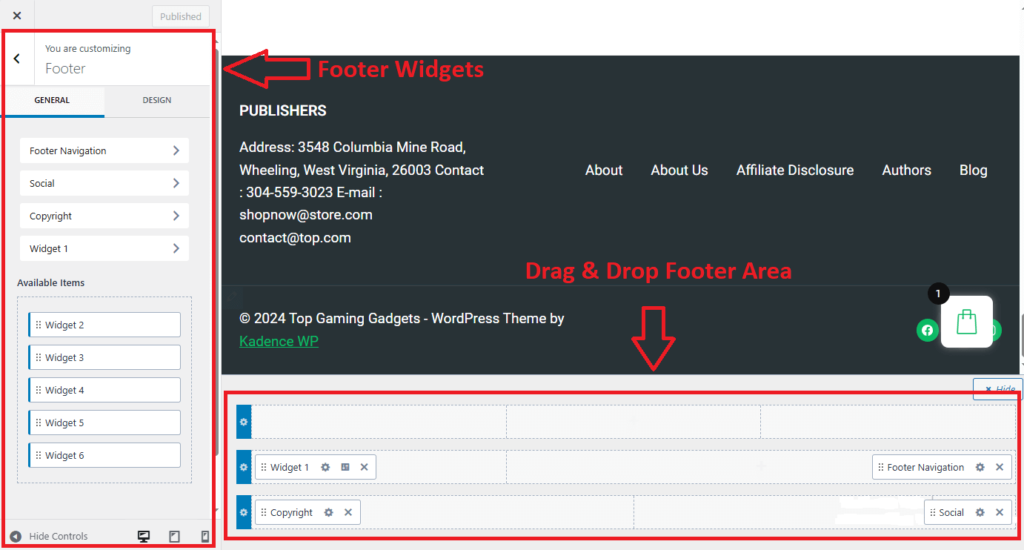
Three rows are available, and you can add up to six widgets in a maximum of five columns.
Kadence free theme allows you to edit or remove the footer copyright text that other themes don’t offer.
Also Read:- Spectra vs Kadence Blocks: Choose The Right Plugin
Kadence Premium Theme Features
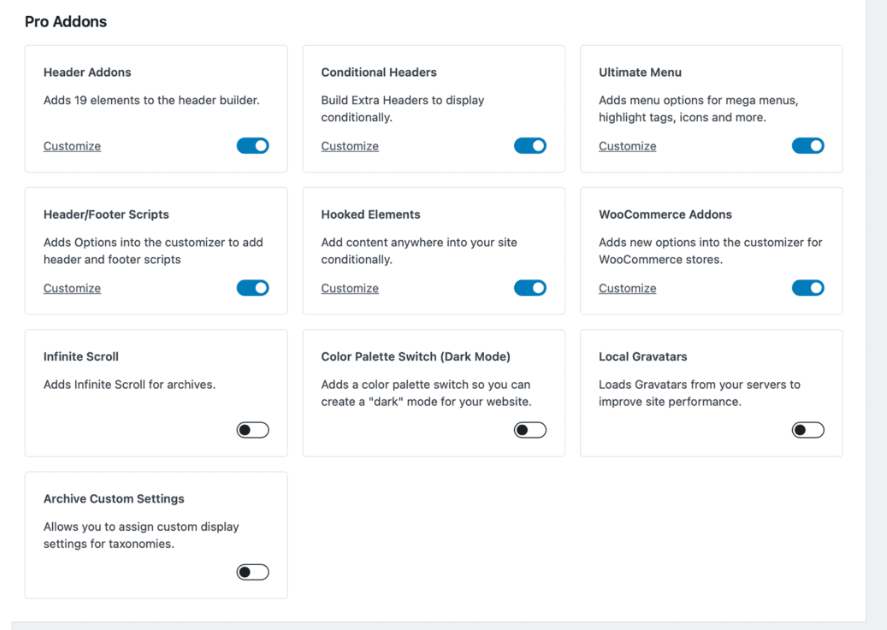
The Kadence free theme offers so many customization options that you may wonder what they offer in the pro version of KadenceWP.
When you purchase the Kadence Pro theme, you will unlock some more theme customization features and one of my favorite Hook elements.
Once you have the Kadence Theme Pro plugin activated, you can toggle on any of the feature add-ons you’d like to activate. These add-ons include:
- Header Addons: Build a premium header with 20 new header elements to choose from.
- Conditional Headers: Build Extra Headers to display conditionally.
- Ultimate Menu: Menu options for mega sub-menus, highlight tags, icons, and more.
- Header/Footer Scripts: Adds options into the WordPress Customizer to add header and footer scripts.
- Hooked Elements: Add blocks or page builder content anywhere on your site, conditionally, and within a specific timeframe.
- WooCommerce Addons: Adds new options to the customizer for WooCommerce stores.
- Infinite Scroll: Adds infinite scrolling for archive pages.
- Color Palette Switch (Dark Mode): Adds a color palette switch so you can create a dark mode for your website.
- Local Gravatars: Local Gravatars from your servers to improve site performance.
- Archive custom settings: Allows you to assign custom display settings for taxonomies.
Let’s discuss each of the above features in detail.
Header Addons & Conditional Headers
Access over 20 additional header elements, such as account icons, contact elements, dividers, search bars, extra buttons, toggle panels, widget areas, and extra HTML sections, enabling the creation of a premium, customized header.
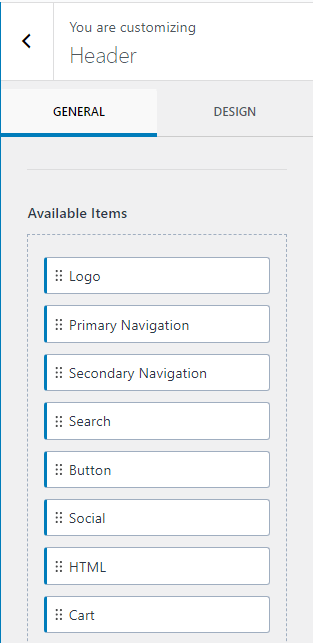
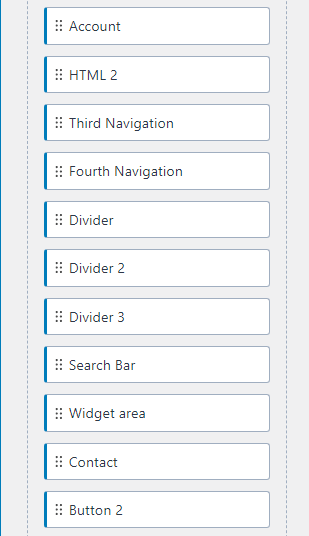
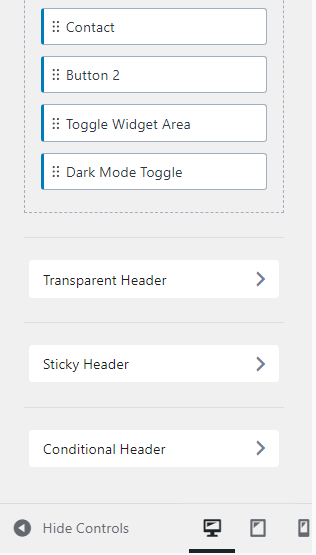
You can add extra functionality, such as account login/logout buttons, a contact number, or additional navigational links directly to your header.
The Conditional header also helps you create headers specific to certain pages or user roles, like a unique header for logged-in users.
These are the additional header items in the pro theme:
Ultimate Menu
The Ultimate Menu enhances your site’s navigation with features like multi-column dropdowns, custom content in dropdowns, custom backgrounds for dropdowns, and the ability to add icons to menu item labels.
For example, the KadenceWP website also shows the ultimate menu of their website.
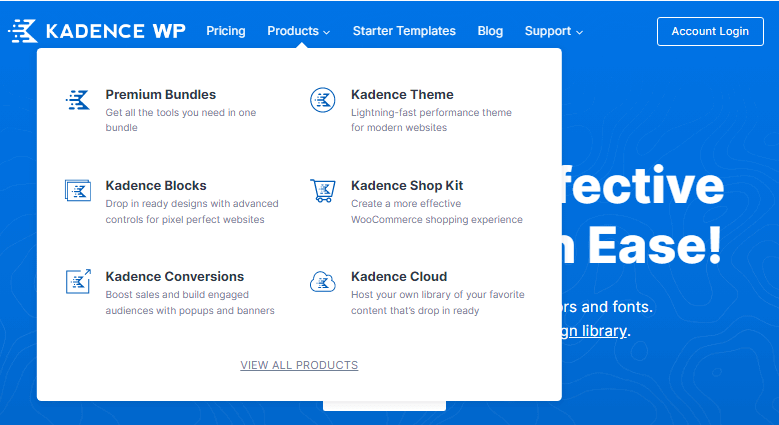
Kadence Ultimate Menu feature allows you to:
Mega Menus: Build complex, multi-column dropdown menus ideal for e-commerce or content-heavy sites.
Custom Dropdown Content: Add images, forms, widgets, or blocks to dropdowns for a highly interactive menu.
Icon Support: Add icons next to menu items for better navigation and user understanding.
Styling Options: Customize colors, hover effects, and typography for menus.
Mobile Menu Enhancements: Tailor your mobile navigation with toggle options, compact designs, and better interactivity.
Header/Footer Scripts
Sometimes you have to install some scripts or codes like; Google Analytics code, Google Adsense code, or Facebook pixels code on your website.
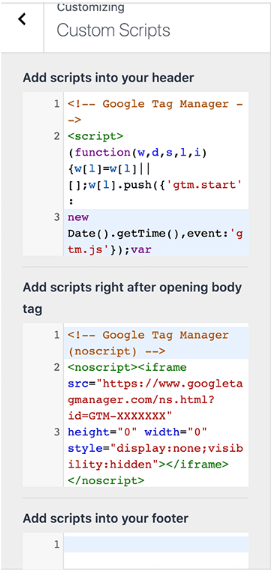
So, this feature of Kadence pro will help you to insert your code into the header or footer of your website.
You don’t need to install any additional plugins to insert any code in your website’s header & footer.
Hooked Elements
The Hooked Element helps you to create custom elements that can help you to add content anywhere on your website.
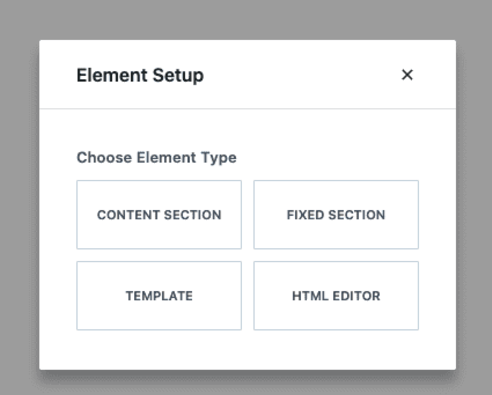
With conditional display options, you can insert blocks or page builder content anywhere on your site, including targeting specific users, setting expiration dates, building custom 404 pages, or replacing header/footer content.
You can also show the elements on the custom pages, like blog posts, pages, and any other place on your website. For example:
WooCommerce Addons
You will get some additional features in the theme customizer if you own a WooCommerce store or website.
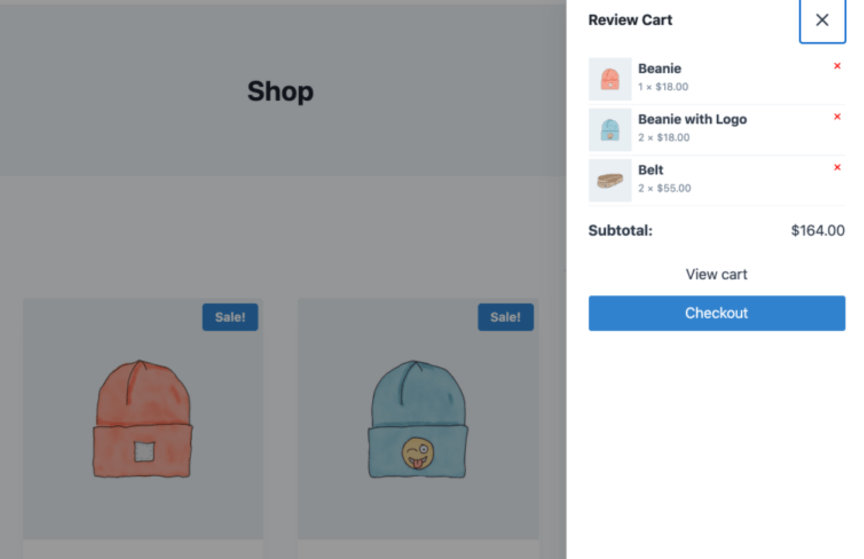
The Kadence WooCommerce Addon offers features like auto-opening side carts when products are added, custom shop pages built with blocks or page builders, shop toggle widget areas, and AJAX add-to-cart functionality for single product pages.
Infinite Scroll
Kadence Pro offers an infinite scroll feature for blogs, archives, search results, products, and custom post types so your users can read more.
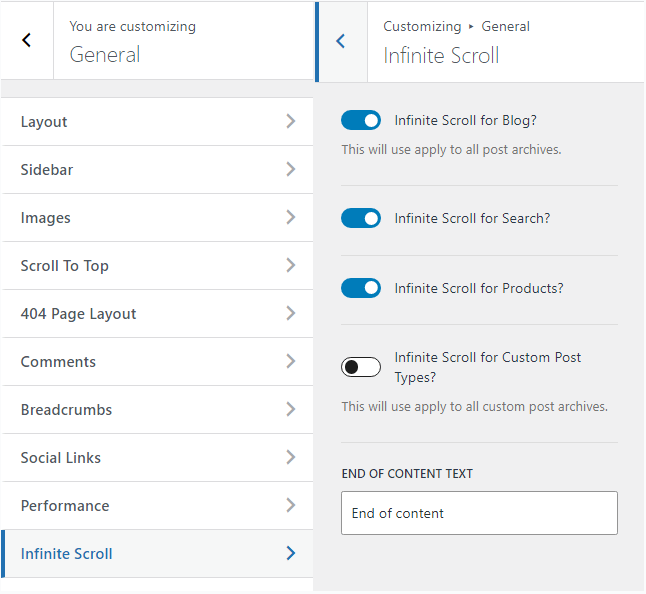
The post URL will change to another post URL automatically when users complete the first post.
Color Palette Switch (Dark Mode)
Kadence pro enables seamless switching between different color palettes, such as transitioning to a dark mode for better readability and aesthetic preferences.
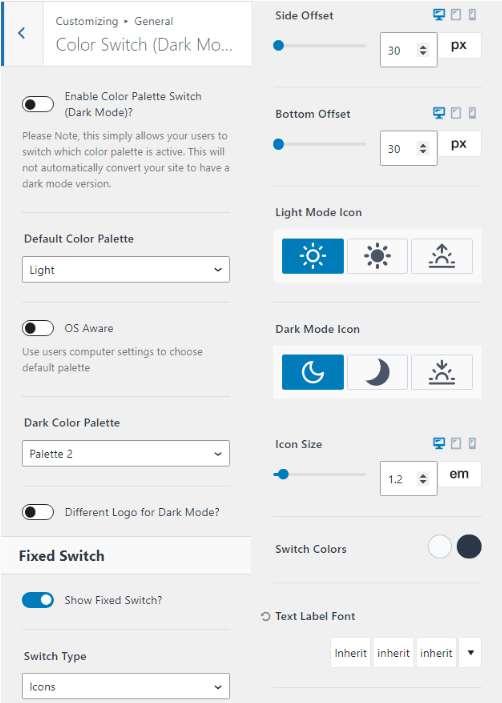
It is particularly useful for enhancing user experience, as many people prefer dark mode for low-light environments or its modern design appeal.
Local Gravatars
Kadence Local Gravatars is a feature in the Kadence WordPress theme or plugin ecosystem that optimizes how Gravatar images are loaded on your website.
This feature stores user profile images (Gravatars) locally on your website instead of fetching them directly from the Gravatar servers for every page load.
This can lead to improved performance and privacy for your visitors.
Archive Custom Page Title Backgrounds
The Archive custom page title background is a feature in the Kadence Pro WordPress theme that allows you to customize the background design of the title section on archive pages.
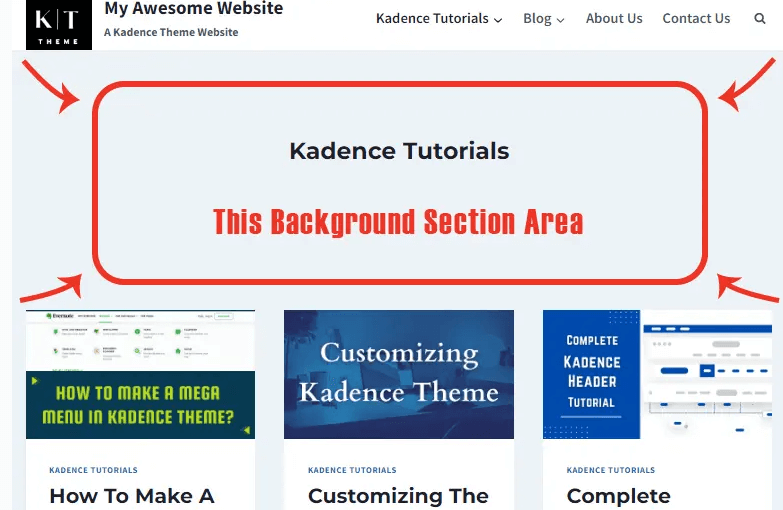
Archive pages include category, tag, author, date-based archives, or any custom post-type archive pages.
This feature enables you to enhance the visual appeal of these pages by giving them a distinct and engaging header.
So, above are some of the best features of the Kadence Pro theme. I’ve mentioned all features of the Kadence free and pro themes, so let’s move to the pricing of the Kadence premium theme.
Kadence Pricing Plans (Updated)
You can access Kadence products through different pricing plans, as Kadence offers three different plans apart from the Kadence lifetime deal plan.
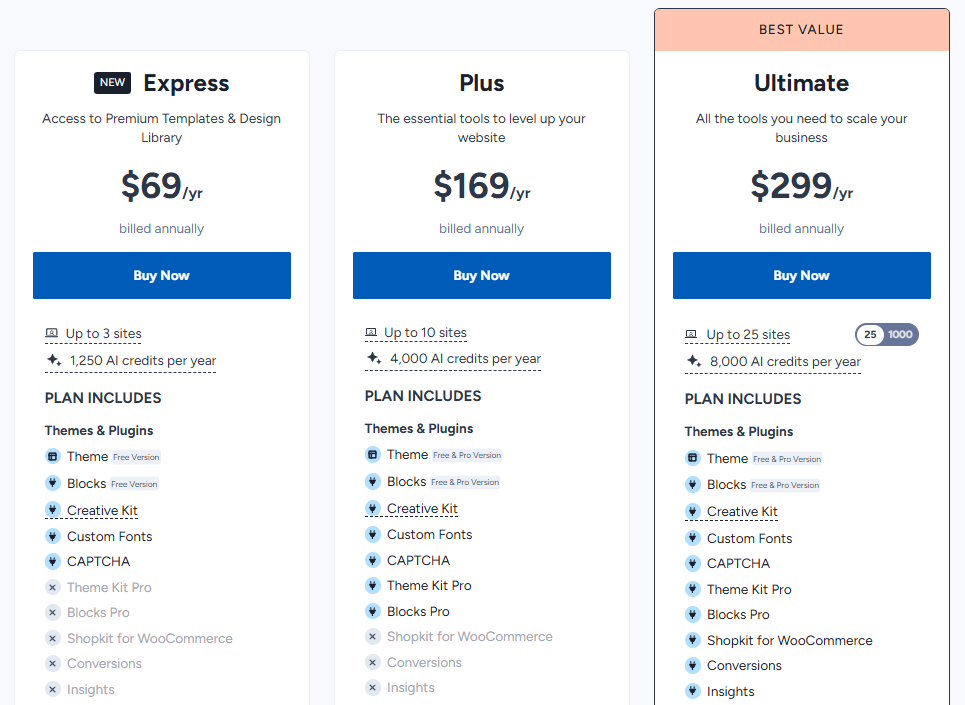
These plans are Kadence Express ($69/year), Plus Bundle ($169/year), & Ultimate Bundle ($299/year), respectively.
Here are the details of each of the Kadence pricing plans:
Kadence Express
The Kadence Express plan is the basic plan, which only gives you the Kadence free theme & Blocks. This plan costs you $69/year, which includes limited features ofthe Kadence theme.
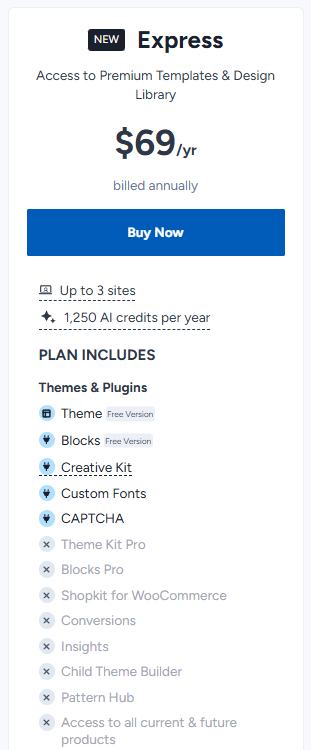
Here are the key features of the Kadence Pro theme:
Kadence Plus Bundle
The Essential Bundle of Kadence is best for you if you want to create a professional website using Kadence starter templates.
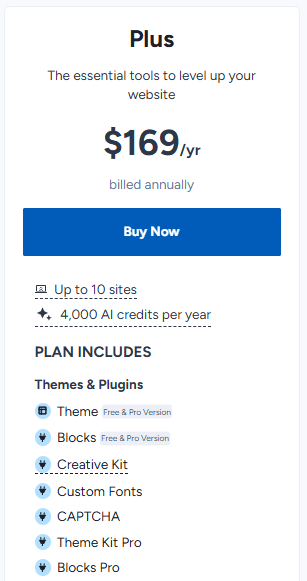
Kadence Essential Bundle costs you 169/year, including the Kadence pro theme, Kadence blocks pro & Kadence Starter templates.
Here are the Kadence Essential Bundle’s key features:
Kadence Full Bundle
The Kadence full bundle is the most premium plan, costing $299 for a year of premium updates and support.
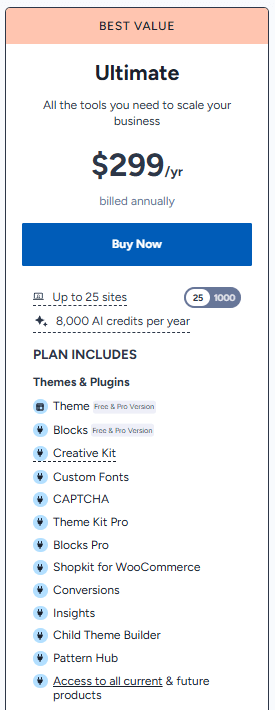
You will also get access to all their future plugins & themes. Here are the key features of Kadence Full Bundle:
Kadence Lifetime Deal
Kadence lifetime deal is the lifetime plan of Kadence full bundle that includes everything for $899 (Normal cost).
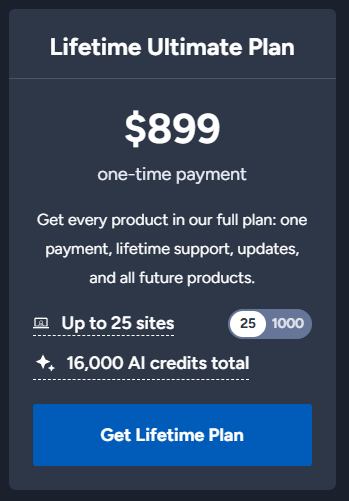
That means you will get all the things mentioned in the Kadence full bundle for a lifetime. This also includes 16000 AI credits and all their future products as well.
Isn’t it amazing?
You don’t need to pay a single penny after purchasing this lifetime deal. Check out our detailed tutorial on the Kadence lifetime deal.
Kadence Theme Pros & Cons
In this section of our Kadence free vs pro theme tutorial, I will give you some pros and cons of choosing the KadenceWP premium.
Pros
Cons
What To Choose Between Kadence Free vs Pro?
Deciding between Kadence Free and Kadence Pro depends on your specific needs and the scope of your website.
Here’s a detailed breakdown to help you choose:
You’ll probably be comfortable with the Kadence free theme:
You definitely need to purchase the Kadence Pro:
You can use our discounted link to get an additional $20 discount on the Kadence bundles for wpcomparisons readers.
Conclusion on Kadence Free vs Pro 2026
There’s no doubt that Kadence is the best freemium WordPress theme in the market, and it even gets better in the pro version.
The KadenceWP theme can surely remove some additional plugins from your website through its features, like author bio, related post, or showing the last updated date in a WordPress post.
Choosing between Kadence free vs pro completely depends on your needs and choice. However, I can suggest you choose better.
Go with Kadence Free theme if you are going to start a simple blog or don’t want more customizations on your website.
Go with Kadence Pro theme if you really care about the website layout, template & design, and want to attract users to get more conversions.
I hope my Kadence free vs pro tutorial helps you to choose the best version of the Kadence theme.
If you have any queries, feel free to ask me in the comments box below.
FAQs on Kadence Free vs Pro Theme
What is Kadence Theme?
Kadence is a feature-rich WordPress theme that comes with free and premium versions. The free theme is available to use for a lifetime, and the pro addon unlocks more features to create a stunning website.
Is the Kadence theme good for SEO?
Yes, Kadence is a fast-loading, SEO-friendly, and highly customizable WordPress theme that will rank your website on search engines easily.
Is the Kadence theme mobile responsive?
Yes, the Kadence theme is compatible with all types of devices, including tablets, mobiles, and Windows.
Does the Kadence theme work with Elementor?
The Kadence theme works really well with all types of page builder plugins, including the Elementor plugin.
Will my website break if I don’t renew my license key?
No, your website won’t break if you don’t renew your license key. You will not receive any updates for the theme, and when you renew it, you will start receiving theme updates.
What’s the KadenceWP refund policy?
KadenceWP all pricing plans come with a 30-day money-back guarantee. You will get all your money back within 30 days if you don’t like the Kadence products.

Very well explained the kadence free vs pro versions. My all doubts are clear.
Thanks